Formative Assessment Technology Tools
Formative assessment tools allow teachers to assess student learning and provide feedback in order to gain understanding. Teachers can use formative assessment many times throughout the class to gauge their students' learning; formative assessment is typically done in a low-stakes context. Psychology teachers can use formative assessment in their classes to ask a short series of questions about a lecture, reading or specific learning objective. Although this could be done on paper, the beauty of adding technology tools to the classroom for formative assessments is that they can provide instant feedback. Feedback helps to reassure students about what they know and can guide how they use their time to study. A teacher could use Socrative or the Google Forms quiz feature which allows a teacher to not only instantly show the correct answer, but also to include an explanation for why an answer is correct.
A blog post on using formative assessment tools in the high school psychology class was published in an APA-supported blog in 2019, but removed when the blog ended in 2025. Please contact topss@apa.org if you would like a copy of this original post.
Interactive Lecture Technology Tools
Whether or not you are flipping the classroom, interactive lecture tools can be helpful in engaging students with the lecture content. Some interactive lecture tools (e.g., PollEverywhere, Google Q & A) allow teachers to ask questions of students during their lecture, providing an opportunity for the teacher to assess student learning of the material while at the same time promoting student engagement. Peardeck and Nearpod let teachers create interactive slideshows that give a space for students to respond to formative assessment prompts, such as to draw a neuron, right in the middle of a lecture. These tools are great for asking students to demonstrate understanding while giving direct instruction.
A blog post on using interactive lecture tools in the high school psychology class was published in an APA-supported blog in 2019, but removed when the blog ended in 2025. Please contact topss@apa.org if you would like a copy of this original post.
Social Learning Technology Tools
Social learning tools allow students to interact with each other, the teacher and the course content. A teacher might choose to pose questions to students via a social learning tool outside of class hours so that students can be encouraged to think about the material outside of class. Additionally, students can interact with their teacher by asking questions. For example, teachers could use the website or app Flipgrid to have students respond to their classmates' video discussion posts. Students could use Padlet to share resources for a topic or answer an opening hook question. Students could also collaborate through any of the tools in the Google Suite for Education.
A blog post on using social learning tools in the high school psychology class was published in an APA-supported blog in 2019, but removed when the blog ended in 2025. Please contact topss@apa.org if you would like a copy of this original post.
Creation Products Technology Tools
Assessments in our online, blended and face-to-face classrooms take many forms. At the highest level of Bloom's Taxonomy and Webb's Depth of Knowledge is the ability for students to create their own learning product. These tools are engaging and focused on providing students with opportunities to do just that. Piktochart and Venngage provide tools and templates for students to create their own infographics. Soundtrap, Prezi and Screencast-o-matic are tools that students can use to create stimulating audio and visual presentations that can be shared with their peers. Teachers can have students use Soundtrap to produce a podcast on a topic or share an interview they conducted.
A blog post on using creation technology tools in the high school psychology class was published in an APA-supported blog in 2019, but removed when the blog ended in 2025. Please contact topss@apa.org if you would like a copy of this original post.
Mobile Apps Technology Tools
In our Bring Your Own Device (BYOD) and 1:1 environments, use of mobile apps can be invaluable. Almost every tool has website access and can also be downloaded as an app. Popplet, for example, is a tool for creating cognitive maps which can help students to learn and reinforce connections between constructs or topics. Plickers is an app that does not require students to have their own devices, but rather allows teachers to collect real-time formative assessment data.
A blog post on using mobile apps in the high school psychology class was published in an APA-supported blog in 2019, but removed when the blog ended in 2025. Please contact topss@apa.org if you would like a copy of this original post.
Teacher Technology Tools
Suggested tools in this category relate to classroom management. Leveraging technology like Planboard , for instance, can help with organization and lesson planning and allows for lesson plans to be shared with substitute teachers or student interns. It also allows teachers to import lesson plans from other teachers as well. Tools like Zipgrade and Akindi not only provide seamless and rapid grading, but also provide item analysis that can be used to improve and review classroom teaching.
A blog post on using teacher technology tools in the high school psychology class was published in an APA-supported blog in 2019, but removed when the blog ended in 2025. Please contact topss@apa.org if you would like a copy of this original post.
Please Note
Technology changes frequently and the tools listed above are a snapshot of what is available at one point in time in 2019. The TOPSS Committee will review this listing on an annual basis to make updates as needed. Also, when using technology in the classroom, teachers should always consider any potential pitfalls in using these technologies. For example, lack of good classroom wifi (and for tools used outside the classroom, student home access to the Internet) or lack of current technology in the classroom (e.g., not enough or no computers or tablets) should be considered before using any tool in the classroom. When tools are more complex, class time will need to be spent teaching students how to use the technology and troubleshooting when things go wrong. Teachers should consider how comfortable they are with the amount of class time needed to introduce a new tool in class before adopting a particular tool. An additional issue with third party tools like those listed above is data security. Teachers are encouraged to find out if student data are kept private with any of the tools above and may want to check with the school principal if there are privacy or security questions.


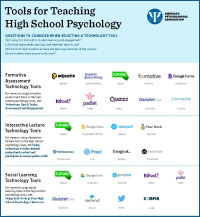 There are many technology-based tools that can be helpful for classroom teachers, and sorting through them to find ones that may be useful can be challenging. This web page describes pedagogical categories of technology tools for teachers; an infographic of useful technology tools grouped by the categories below is also available so that teachers can more easily identify which technology tools may be of use to them. Teachers who may not use technology might want to start with just one tool, while those who are more familiar with some technology are encouraged to try a new tool that suits their classroom purposes. The tools were selected with high school teachers and the high school classroom (both in person and online) in mind. Ease of access and use were considered in selecting these tools, and only those tools that were free in at least some capacity are listed below.
 Developed by the APA Working Group on Technology and Online Learning from the APA Summit on High School Psychology Education (July 2017): Ladonna Lewis, Brad Wray, Heather Chambers, Tracy Dryer, Amy Hooper, Kent Korek, Michael Sandler, Jennifer Thompson, Josh White. Thanks to Sue Frantz and Joe Geiger for their reviews of this material.