

Part III: Specific media formats
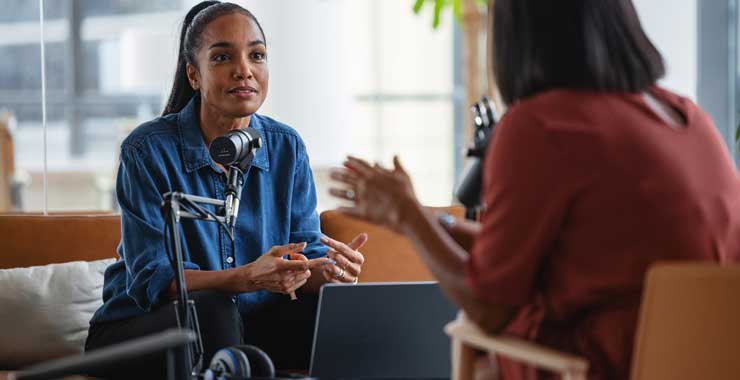
Television and radio interviews
Preinterview process
Given the skills necessary for a good broadcast interview, reporters or producers will often conduct a preinterview to make sure that you are the right person for a high-profile story.
Treat the preinterview as seriously as you would the actual interview. This is, in effect, your dress rehearsal and it’s your job to convince the reporter or producer that you are the right person to talk to. Be animated and quotable. If you aren’t, the journalist will move on to someone else.
Interview formats
Since the Covid-19 pandemic, many interviews are being conducted from home using technology such as Zoom or Teams rather than having a guest travel to a studio. However, you may still be asked to attend an interview in person.
Radio/audio interviews may take place with video even when only audio is being used. Find out in advance if they will need just audio or video as well. You may also be asked to download an app to your phone to record your part of the conversation.
In-person studio interviews
A media representative will generally contact you to go over more details and/or to make travel arrangements. Major outlets may offer to provide transportation from your location to the studio.
Arrive early and review your prepared statements. (Bring notes.) If you are offered makeup, say yes as it will make your face less shiny under the studio lights.
What to wear for video
Aim for conservative, professional clothing in solid colors. Light gray or blue shirts work well, as do dark suits or jackets with solid-colored ties or accessories.
Avoid:
- checks, stripes, or other busy patterns
- sunglasses or tinted glasses
- heavy makeup (although powder will help reduce shine under hot studio lights)
- distracting jewelry
Remote video interviews
With Zoom, Google Hangouts, and other video and audio applications readily available, news outlets can get an expert on the air in a matter of minutes or record them anywhere there’s a high-speed internet connection.
Technical setup
Don’t wait until you’re on the air to see how you look on the video feed. Practice with a friend or coworker to make sure you and your surroundings look top-notch. Test your lighting and background in advance—is your face clearly visible and well lit? Is the background neutral and without distractions?
When you’re being interviewed in a studio, you don’t have to worry about the lighting, but over Zoom, you need to be cognizant of your surroundings. If you need to set up near a window, make sure it’s not behind you creating glare. Make sure your face is not in shadow. Adjust your camera so you are looking head on.
Audio considerations
Many laptop webcams are poor quality, so you might want to invest in a high-definition webcam and a better quality microphone, rather than the one built into your laptop.
Be aware of background or outside sounds that could interfere with the interview. If you are in a room with a ceiling fan, make sure it’s turned off. Silence your cell phone and any other devices with audible notifications. Tell your family members or others in your home not to interrupt you during the interview.
If you’re wearing headphones, choose the wired kind. Wireless headphones can create sound feedback because of their Bluetooth connection. Also, if you’re concerned about how headphones look, use ear buds.
Background and environment
If you’re doing an interview from your home or office, be sure to clean up. If you have a poster or sign with your organization’s logo, you might try putting it behind you so it’s in the shot but not too intrusive. Many people set up in front of bookcases in their home offices so make sure any book spines that are visible are from books that won’t be a distraction because of subject matter or author. Avoid using virtual backgrounds; they rarely reproduce well on a big screen.
Turn off email and other desktop notifications that may pop up and distract you during your interview.
Camera technique
Look at your computer’s camera, so it appears to viewers that you are looking at them. Consider putting a bright sticker or other marker next to it to draw your eyes to it. If it’s distracting to see yourself on screen, consider covering it up or turning off your monitor, or if your webcam is not built in, move the camera away from the screen so that you look at it directly and not at your image.
Live vs. recorded interviews
Find out in advance whether your interview will air live or be recorded to air at a later point. A third possibility is that it could be recorded as if live. When an interview is recorded, the interviewer is likely looking for one or two short soundbites that will be edited into a longer story.
If you fumble or misspeak during a recorded interview, it’s OK to ask to start again or to ask for the question to be repeated. This should be avoided in a live interview, or an interview that is recorded as if live. Live interviews tend to be very short—you may only be on air for a few minutes.
Interview techniques for broadcast
- Speak in short, succinct sentences (“sound bites”).
- State your overall message followed by the supporting points.
Example
Message: Youth violence is preventable because it is a learned behavior.
- Point 1: “It is important to recognize the early experiences that can lead to violence and confront them. For instance, exposure to violence in the media, effects of prejudice and hostility in the home or community, access to firearms.”
- Point 2: “Psychologists are helping to develop school programs that reduce aggression and prevent violence.”
- Point 3: “Here are some examples of successful programs that have been implemented in schools and communities across the country.” Then name them.
Be animated. Let your passion for your topic show. Natural hand gestures and facial expressions help to highlight your points and show your enthusiasm, which will be reflected in your voice and serve to persuade.
If you are being interviewed in a TV studio, look at the interviewer, and avoid looking into the camera or monitors. You can always ask in advance where they want you to look.
Controlling the interview: The pivot
Keep in mind that your knowledge and expertise are what led the journalist to reach out to you.
Know your key points and use them throughout the interview. But if you are not asked the “right” questions, you can help shape the interview in a professional, assertive manner.
You can steer the direction of the interview effectively by using transition phrases:
- “That’s a good question, but what is really important is...”
- “I’d like to make this point before I continue.”
- “Let me give you the latest information on…that is really interesting.”
- “What your readers/viewers may not know is…”
You can then shift the direction of the interview and make one of your points. At the end of the interview, you may be asked “is there anything that I missed?”—always use this as an opportunity to restate one of your key points.
Panel interviews
If you are part of a discussion panel with other experts, each of you will be competing for airtime.
Ask beforehand who the other panelists will be. Producers will sometimes try to create controversy so consider your comfort level with the other guests before agreeing to a panel interview.
If you aren’t being included in the discussion, you don’t have to wait to speak until a question is directed to you. You were invited on the program because of your expertise, and you should participate and raise key points or clarify ones made by other panelists when appropriate.
Be assertive; most interview segments last only a few minutes, so claim airtime before the interview is over.
Radio interviews
Most large cities have a radio station with an all-news or all-talk format. Other radio stations rely on feeds from network newscasts and wire services, which also have broadcast arms.
Many news directors will accept interviews conducted by telephone or via teleconferencing like Zoom or Teams, both live and taped.
In a radio interview, rephrase your important points and say them several times, because radio programs often have listeners tuning in at various times throughout the interview.
Chapter 6: Podcast interviews
Podcast listenership has grown rapidly in recent years, and podcasts are a great way to reach a wide audience and get your message out to the public.
Podcast interviews share some similarities with television and radio interviews but are usually longer—often half an hour to an hour long—allowing more time for in-depth conversation.
When producers approach you
Research the podcast
- Listen to several episodes to understand the host’s style and the show’s content.
- Ask the producer or host to describe the show’s target audience and how large it is.
- Find out if the podcast is audio-only or whether it will include video.
Pitching yourself to podcasts
Find psychology or science podcasts that would be a good fit. For instance, some popular psychology and mental health podcasts include:
- Speaking of Psychology (APA’s flagship podcast)
- Under the Cortex
- The Happiness Lab, with Dr. Laurie Santos
- The Psychology Podcast
- Hidden Brain
- Choiceology
- Psychologists off the Clock
Send a pitch email to the producer, explaining briefly why you would be a good guest. This could include a short bio, links to other interviews you’ve done, an offer to send your latest book, if you have one, or relevant article(s) you’ve written.
Preparing for the interview
Equipment setup
Most podcasts are recorded remotely, as opposed to in-studio. Find out what recording platform the podcast uses (Zoom, Riverside, etc.). It may be helpful to arrange a preinterview call or log on to the interview a few minutes early to make sure you’re able to connect—particularly if you haven’t used the platform before.
Find out what equipment you’ll need—generally this entails good headphones, a decent microphone, a computer, and an internet connection. Test your equipment and connection ahead of time. Use the best quality microphone you have available.
Content preparation
Some podcast producers and hosts will send questions ahead of time, others will not. Either way, think about the questions that they are likely to ask you and the messages you’d like to convey. It may be helpful to prepare talking points, anecdotes, etc., ahead of time.
During the interview
Environment setup
Find a quiet space to record. In general, small rooms with low ceilings, carpet, curtains, and other sound-dampening qualities work best.
If the podcast will include video, consider your background and the position of your camera and microphone. (All of the technical guidelines from the remote interview section apply to video podcast interviews.)
Minimize distractions. Turn off your cellphone or set it to silent and turn off notifications. Close other tabs and browsers on your computer. Inform other people nearby (in your home or office) that you’ll be conducting an interview. Turn off appliances such as fans, dishwashers, or anything else that might make noise in the background.
Interview style
Unlike most television or radio interviews, podcast hosts and producers will not be looking for sound bites—you will have more time for in-depth discussion. However, aim to keep your answers lively and accessible, and avoid using technical language or jargon.
Podcasts are generally recorded and not live. Confirm with the interviewer, but it is possible that if you need to restate an answer or need a question repeated, the podcast sound editor will be able to correct it in editing.
After the interview
Promotion
Ask the producer or host to let you know when the episode will post. Share the episode link on your social media channels and website if you have one.
Supporting materials
If you discussed specific research studies, resources or other materials during the interview, send them to the producer to include in the show notes.
Date created: August 2025